Never lose a song you heard on the radio
40,000+ live stations from 190+ countries. Radio Compass writes down every track that plays on air — and sends it straight to the music service you already use.
Free · No account needed · iPhone version coming soon
- 40,000+
- Radio stations
- 190+
- Countries
- 12
- App languages
What makes it different
Radio plays it once. Radio Compass keeps it.
Every other radio app leaves you with a song you liked and no way to find it again.
It reads the air
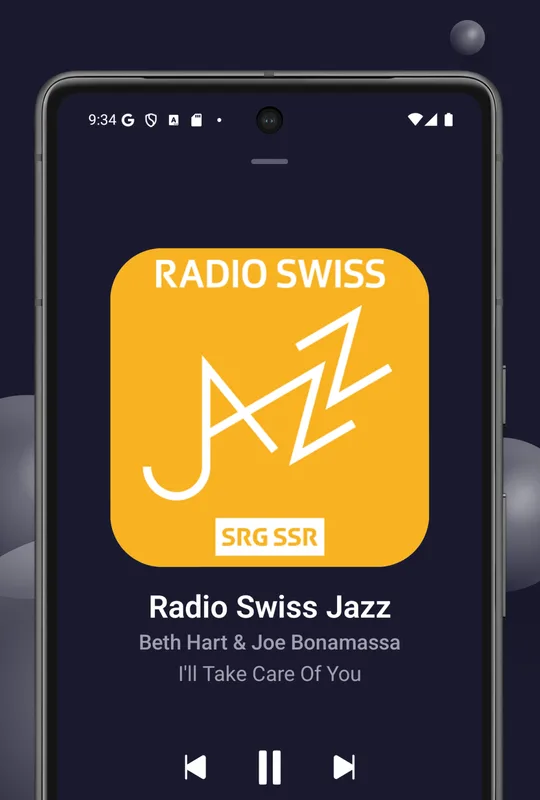
Stations broadcast the artist and title of what is playing. Radio Compass shows it live on the player, instead of just the station logo.
It writes it down
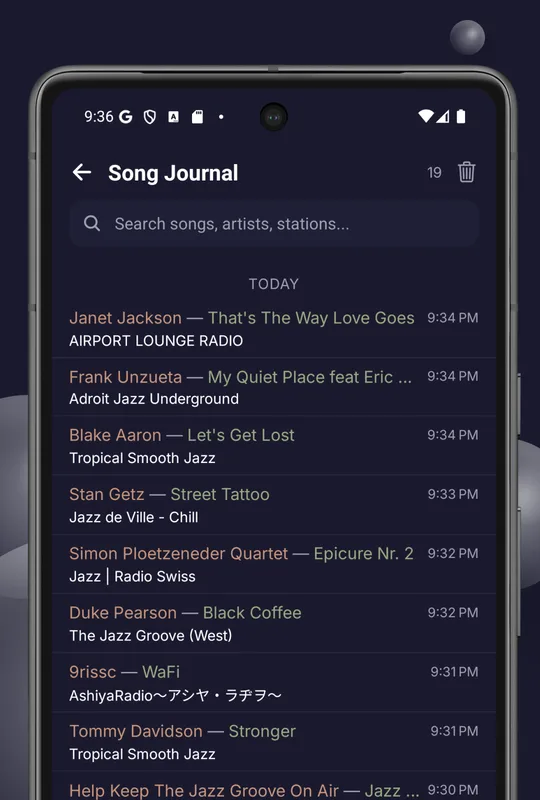
Every track lands in the Song Journal with the station and the time, searchable by song, artist or station — long after the broadcast has moved on.
It hands it over
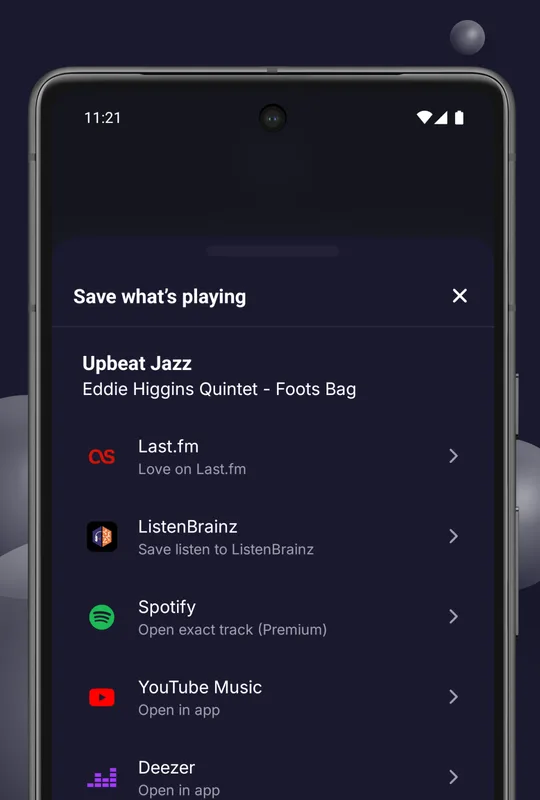
One tap sends the track to the service you actually use: scrobbled to Last.fm and ListenBrainz, or opened directly in Spotify, YouTube Music or Deezer.
- Last.fm
- ListenBrainz
- Spotify
- YouTube Music
- Deezer
A look inside
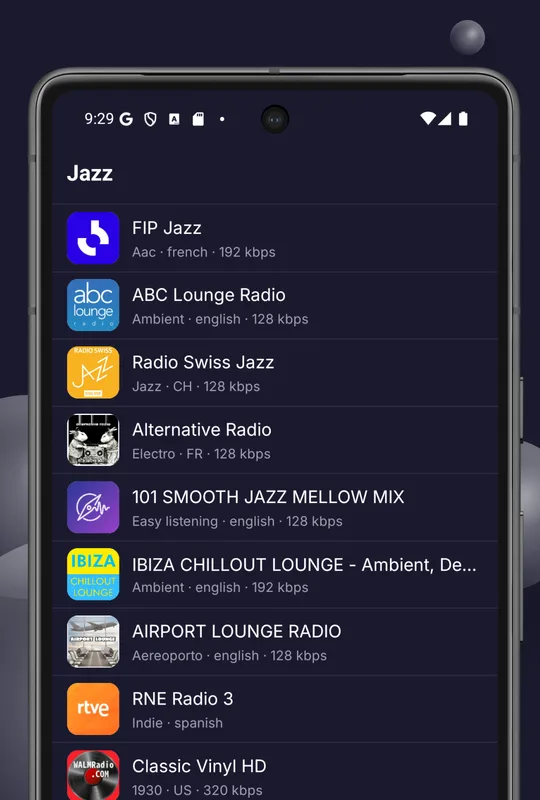
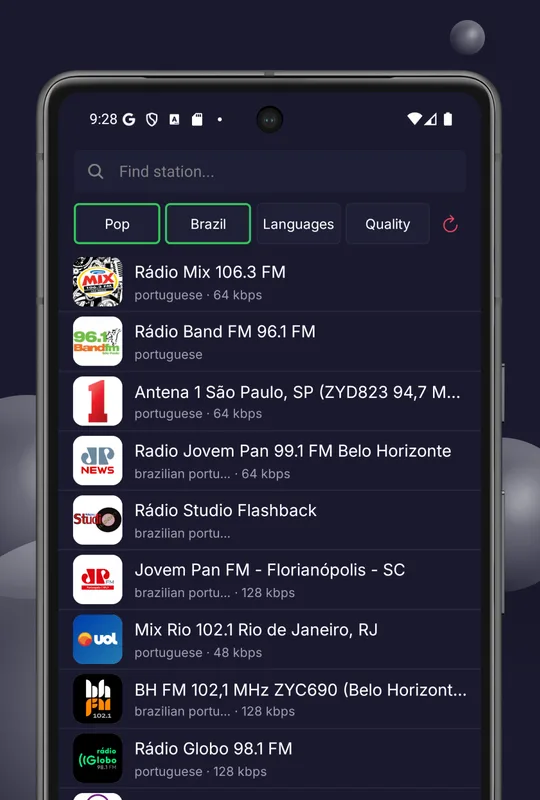
Dark and light themes, station logos, bitrate and language on every row.
Everything else you would expect
Streams that actually work
Stations are checked regularly and dead links get refreshed. Unavailable streams are skipped automatically and reconnect quickly — less tapping “retry”, more listening.
Stations from everywhere
Pop, rock, jazz, classical, electronic, hip-hop, news, sport and talk, from 190+ countries.
Search and filters
Search by name, then narrow by genre, country, language and stream quality at the same time.
Favourites & collections
Unlimited favourites with optional cloud sync across devices. Grouping them into collections is a Pro feature.
Plays in the background
Lock screen and notification controls with album art, plus Bluetooth and headset buttons for play, pause and skip.
Sleep timer
15 to 120 minutes, ending in a smooth fade-out rather than an abrupt cut.
Dark and light themes
Follows your system setting, or pin it to the theme you prefer. 12 interface languages.
Privacy first
No data selling and minimal collection. Analytics can be switched off in settings at any time.
Who it is for
Music lovers
Radio still plays things no recommendation algorithm would ever hand you — and now you keep every one of them.
Last.fm & ListenBrainz users
Hours of radio listening that never counted anywhere finally land in your profile, scrobbled automatically.
Expats
Your home city's station, the local news and the language you grew up with, wherever you happen to live now.
Language learners
Hours of unscripted native speech at any level of difficulty, free, from the country you are learning about.
News followers
Hear how an event is reported where it is happening, live and in the local language, not summarised afterwards.
Free and Pro
Listening is free and unlimited. Pro lifts the limits on how much you keep.
Free
$0- All 40,000+ stations, unlimited listening, no ads in playback
- Live artist and track titles straight from the broadcast
- Song Journal — your last 10 songs
- 3 one-tap saves to music services per day
- Last.fm and ListenBrainz scrobbling
- Favourites with cloud sync, sleep timer, dark and light themes
Radio Compass Pro
Subscription- Song Journal — a full 30 days of history
- Unlimited saves to music services
- Up to 20 favourite collections
- Exact-track matching in Spotify instead of a search link
- Scrobble retroactively from anything in the journal
Monthly or yearly, billed through Google Play. The price for your country is shown in the app before you confirm. Cancel any time in Play Store subscriptions — collections you already created stay in your account.
Frequently asked questions
Is Radio Compass free?
Listening is. All 40,000+ stations, search, favourites and scrobbling are free and unlimited, with no account required and no ads interrupting playback. The free tier keeps your last 10 songs in the Song Journal and allows 3 one-tap saves to music services per day. Radio Compass Pro is an optional subscription that raises those to 30 days of history and unlimited saves, and adds favourite collections.
Where do the radio stations come from?
The catalogue comes from Radio Browser, a free community-maintained database of internet radio streams. Radio Compass does not host, re-encode or rebroadcast audio — the app connects your device straight to the broadcaster's own stream.
Why does a station fail to play?
Internet radio streams move and go offline without notice, and a community catalogue always contains some dead entries. Radio Compass automatically tries alternative stream addresses for the same station before giving up. If a station stays broken, try a different one from the same genre or country.
What is the Song Journal?
Radio Compass reads the live track metadata that stations broadcast and writes every song into a searchable journal with the artist, title, station and time. It answers the question radio apps normally cannot: what was that song I heard earlier?
Can I scrobble radio to Last.fm or ListenBrainz?
Yes. Connect your Last.fm account or paste a ListenBrainz user token in settings, and tracks heard on air are submitted automatically. You can also open any song in Spotify, YouTube Music or Deezer with one tap.
Do I need an account?
No. The app works fully without signing in, and favourites are stored on your device. Signing in is optional and only enables cloud sync of favourites across devices.
Does Radio Compass work offline?
No. Live radio is streamed in real time, so an internet connection is always required. Recording streams for offline playback is not supported.
How much mobile data does internet radio use?
It depends on the station's bitrate, which Radio Compass shows in the station list. As a rule of thumb: 64 kbps uses about 29 MB per hour, 128 kbps about 58 MB per hour, and 320 kbps about 144 MB per hour.
Is there an iPhone version?
An iOS version is in preparation and is coming soon. In the meantime you can listen on any device through the web player, which can be added to your iPhone home screen from the Safari share menu.
How do I delete my account and data?
Use the account deletion page, or write to support@virtomaster.com. If you never signed in, there is no account and nothing stored on our servers.
Start listening now
Free on Android, or straight in your browser — no install, no account.